Project case study · production
Homelab disaster recovery
An encrypted, incremental backup and recovery workflow using Restic and Amazon S3, supported by retention policy, bootstrap automation, and a restore runbook.
01
Problem and intended users
A homelab can be rebuilt from code only if its stateful data and recovery procedure survive host or storage failure.
Who it is for
- Homelab operators
- Self-hosters
- Engineers practicing disaster recovery
02
Constraints and design considerations
- Backup data must be encrypted before it leaves the source host.
- Repeated backups should transfer only changed data where possible.
- Retention must balance recovery history with storage usage.
- Recovery must be executable from documented bootstrap steps rather than operator memory.
03
Architecture overview
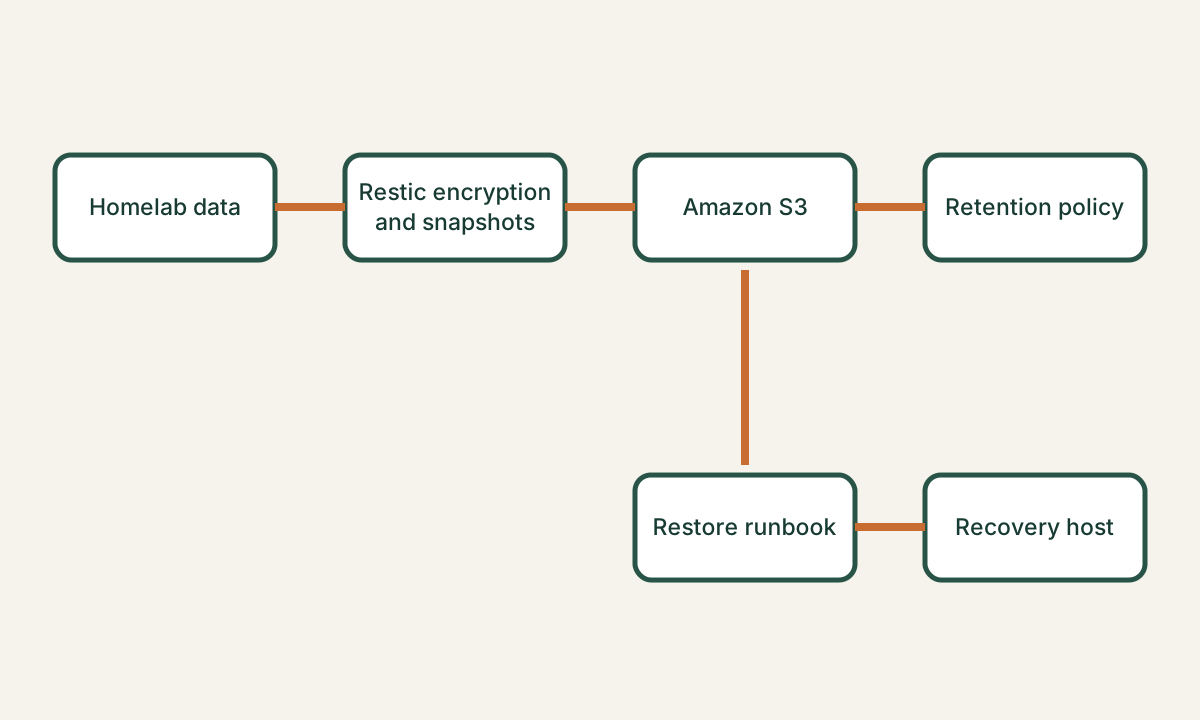
Scheduled automation invokes Restic on selected homelab data. Restic encrypts and incrementally stores snapshots in Amazon S3, then applies the retention policy. A separate bootstrap and restore path prepares a recovery host, obtains protected credentials, verifies available snapshots, and restores selected data according to the runbook.
04
Implementation approach
Automation selects protected paths, runs Restic against an S3 repository, and applies snapshot retention. Bootstrap scripts and a recovery runbook separate machine preparation, credential setup, snapshot inspection, restore execution, and post-restore verification.
05
Operational decisions
- Reliability
- The design treats restore instructions and verification as part of the backup system, not as an undocumented emergency activity.
- Security
- Restic encrypts repository contents, while repository credentials and the encryption password remain outside the backup scripts and source-controlled configuration.
- Cost
- Incremental, deduplicated snapshots and an explicit retention policy limit unnecessary S3 storage growth.
06
Outcomes and current maturity
Current maturity: production
- Automated encrypted incremental backups to off-host Amazon S3 storage.
- Defined retention behavior to manage recovery history and storage growth.
- Documented bootstrap, restore, and verification steps for recovery.
Current limitations
- The workflow protects selected data and configuration, not live service continuity.
- Recovery time and recovery point measurements are not yet published.
- Cloud-account access and separately protected Restic credentials are prerequisites for recovery.
Roadmap
- Schedule recurring restore exercises and record recovery measurements.
- Add independent notifications for missed backups and integrity-check failures.
- Review S3 retention and recovery dependencies as the homelab changes.
07
Lessons learned
- A successful backup command is not evidence of a recoverable system.
- Bootstrap instructions must assume the original host is unavailable.
- Retention and credential recovery need the same scrutiny as backup scheduling.
08